
Example 2:
Now, these two equations --
| 1) x + y | = | 10 |
| 2) x − y | = | 2 |
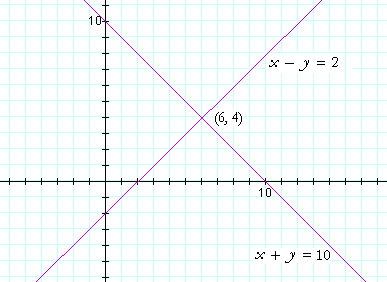
The solution
to the simultaneous equations is their point of intersection. Why?
Because that coordinate pair solves both equations. That point is the
one and only point on both lines.
[text retrieved from http://www.themathpage.com/alg/simultaneous-equations.htm]
Using Geogebra
We can use Geogebra to solve a pair of simultaneous equations:
Step 1: Type the first equation x + y = 4 in the "input" bar at the bottom of the window below and press enter. Geogebra draws the line.
Step 2: Type the second equation x − y = 2 in the input bar and press enter. Geogebra draws the second line.
Now we need to find the point of intersection:
Step 3: Type "intersect[a,b]" in the input bar and press enter.
Geogebra calculates the point of intersection of the two lines a and b and labels the point "A" which should be (3,1). Is this the answer you got?!
 Now, see if you can use Geogebra to draw the lines given in the diagram above. To reset Geogebra, you can open a new window or click the grey button with the 3 lines on the top right of the Geogebra window below, and click 'New' (You can also just refresh this page)
Try it for yourself in the window above:
We will use the same equations as in Example 1:Step 2: Type the second equation x − y = 2 in the input bar and press enter. Geogebra draws the second line.
Now we need to find the point of intersection:
Step 3: Type "intersect[a,b]" in the input bar and press enter.
Geogebra calculates the point of intersection of the two lines a and b and labels the point "A" which should be (3,1). Is this the answer you got?!
Now, see if you can use Geogebra to draw the lines given in the diagram above. To reset Geogebra, you can open a new window or click the grey button with the 3 lines on the top right of the Geogebra window below, and click 'New' (You can also just refresh this page)

No comments:
Post a Comment